Send DTLS#
This action sends messages securely using Datagram Transport Layer Security (DTLS). Use it when the receiving system expects DTLS transport for forwarded messages.
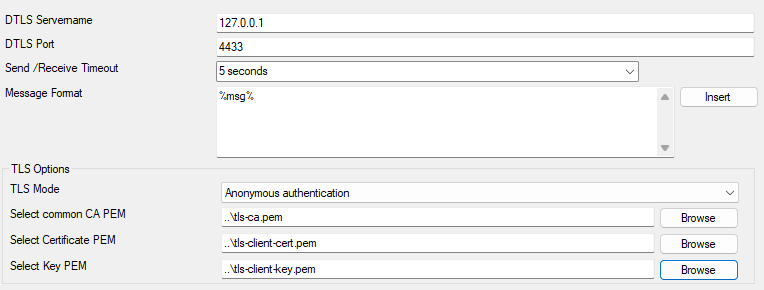
Action - Send DTLS Configuration*
DTLS Servername#
- File Configuration field:
szDTLSServer
- Description:
The hostname or IP address of the DTLS server to which messages should be sent. You can use an IPv4, IPv6 address, or a hostname resolving to one of these.
DTLS Port#
- File Configuration field:
nDTLSSendPort
- Description:
The port number on the DTLS server where messages are sent. Typically, this port is 4433.
Send/Receive Timeout#
- File Configuration field:
nSendTimeOut
- Description:
Specifies the time in seconds to wait for a response from the DTLS server before timing out. For instance, set this value to “5 seconds” for a 5-second timeout.
Message Format#
- File Configuration field:
szMessage
- Description:
Defines the format of the message being sent. Use placeholders like “%msg%” to define the dynamic content of the message. Multi-line messages are supported.
TLS Options#
TLS Mode#
- File Configuration field:
nTLSMode
- Description:
Specifies the authentication method used. Options include “Anonymous authentication” or other modes requiring certificates.
Select common CA PEM#
- File Configuration field:
szTLSCAFile
- Description:
Path to the CA certificate file (e.g., tls-ca.pem).
Select Certificate PEM#
- File Configuration field:
szTLSCertFile
- Description:
Path to the client certificate file (e.g., tls-client-cert.pem).
Select Key PEM#
- File Configuration field:
szTLSKeyFile
- Description:
Path to the private key file for the client (e.g., tls-client-key.pem).